Abuse control
Within hours of going online, any SIP system starts receiving scanner traffic — automated probes guessing extensions and passwords. Abuse control watches for those patterns and bans the sources automatically, before they get enough attempts to matter.
What it watches
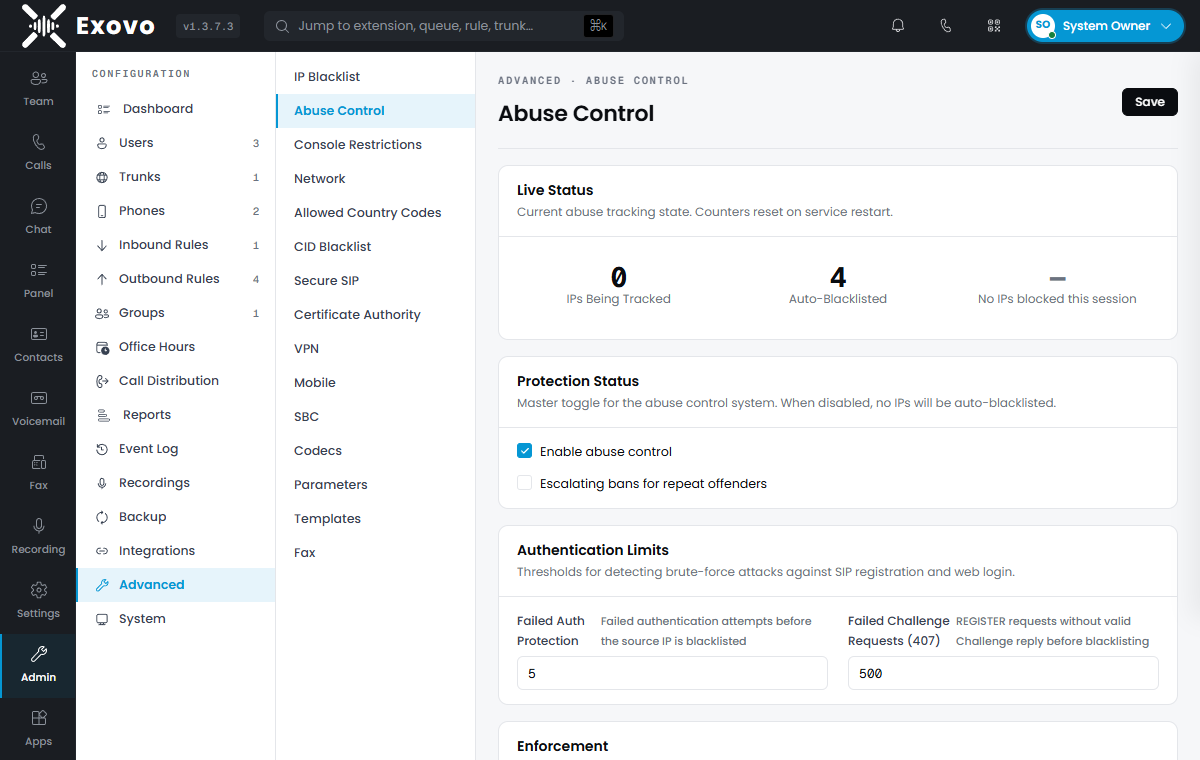
Admin → Security → Abuse Control shows the live state — IPs currently tracked, auto-blacklisted counts, last block — and the thresholds:
- Failed authentication — wrong SIP or web-login credentials; the source IP is blacklisted after the configured attempt count (default 5).
- Failed challenge requests — SIP scanners fire registration attempts without ever completing authentication; these unanswered challenges (407s) have their own, higher threshold (default 500) to catch high-volume probing that never even tries a password.
- Traffic rate — packet-rate barriers escalate from a grace threshold to short temporary blocks to a full blacklisting for outright floods.
Scanning probes against the routing endpoints themselves are banned at the firewall level — the noisiest scanners stop consuming any resources at all.
Bans and escalation
Blocked IPs land on the IP blacklist marked Auto, with a configurable duration (a minute to 7 days). Escalating bans — each repeat offense multiplying the duration — is worth enabling on any internet-facing system.
Every block is logged in the Event Log and can email you. False positives (someone fat-fingering a password from the branch office) are resolved by unblocking the entry on the IP Blacklist page — or pre-empted by adding your known sites as Allow entries.
What it doesn't need
No whitelisting of your carriers or phones is required for normal operation — legitimate devices authenticate successfully and never approach the thresholds. The system is deliberately safe to leave on (it ships enabled) with default thresholds.