Office hours and holidays
Office hours are the system's shared clock: inbound rules, ring groups, queues and digital receptionists all consult the same schedule to decide between their in-hours and out-of-hours behavior.
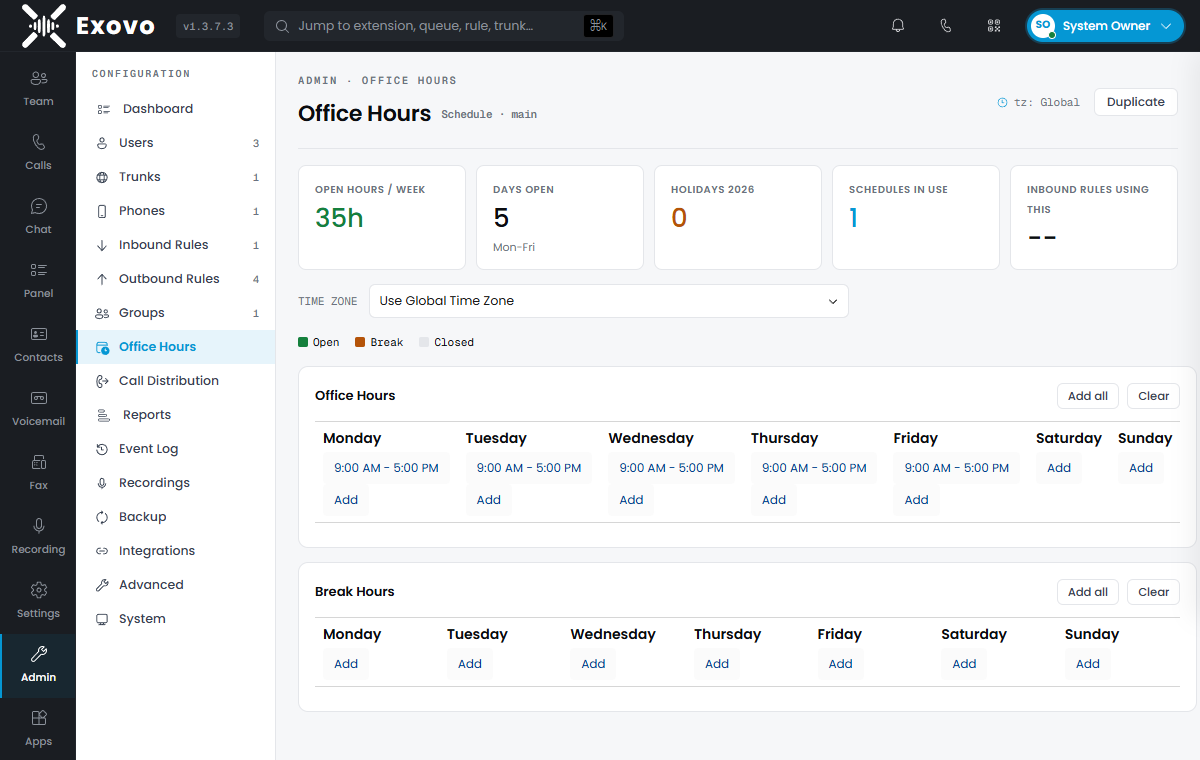
Configuring the schedule
Admin → Office Hours shows a seven-day grid. Each day takes any number of time ranges — Add all seeds a standard Mon–Fri 8 AM–5 PM week you can then adjust. A separate Break Hours grid marks mid-day windows (lunch closure, shift change) as a third state distinct from open and closed, so destinations can treat a break differently from the middle of the night.
An empty schedule means always open — a fresh system routes everything to in-hours destinations until you define hours.
Holidays
Holidays layer on top of the weekly grid: single days or date ranges, whole-day or partial (with start/end times), recurring annually or once. Each holiday has a name and can carry its own prompt. When a holiday matches, holiday routing wins over whatever the weekly grid says — and inbound rules with play holiday prompt enabled announce it.
How destinations switch
Every time-aware object decides for itself what closed means:
- Inbound rules pick between their in-hours and out-of-hours destinations (and can carry a private schedule that overrides the global one — a support line with longer hours).
- Ring groups, queues and receptionists each have closed/break/holiday overrides: accept the call anyway, end it, forward it (optionally after an announcement), or send it to voicemail.
The evaluation happens per call, so schedule changes take effect immediately.
Time zones
The schedule follows the system's global time zone by default; the Time zone dropdown on the Office Hours page pins a schedule to a specific zone instead — the difference matters for teams answering calls for offices in another region. Multiple schedules (via Duplicate) with different zones support multi-site routing, with each inbound rule choosing its schedule.