Backup and restore
One backup file captures an entire Exovo system — configuration, users, rules, history, and optionally the media — encrypted with a passphrase you hold. Restoring it onto a fresh box rebuilds the system, which makes backups double as your disaster-recovery and migration story.
What a backup contains
Two profiles:
- Configuration (recommended default) — everything that defines the system: users, trunks, rules, queues, settings, history.
- Full — configuration plus the bulk media: recordings, voicemail and fax documents.
Every backup is encrypted with a passphrase set when it's made. There is no recovery path around a lost passphrase — store it with your infrastructure secrets.
Scheduled backups
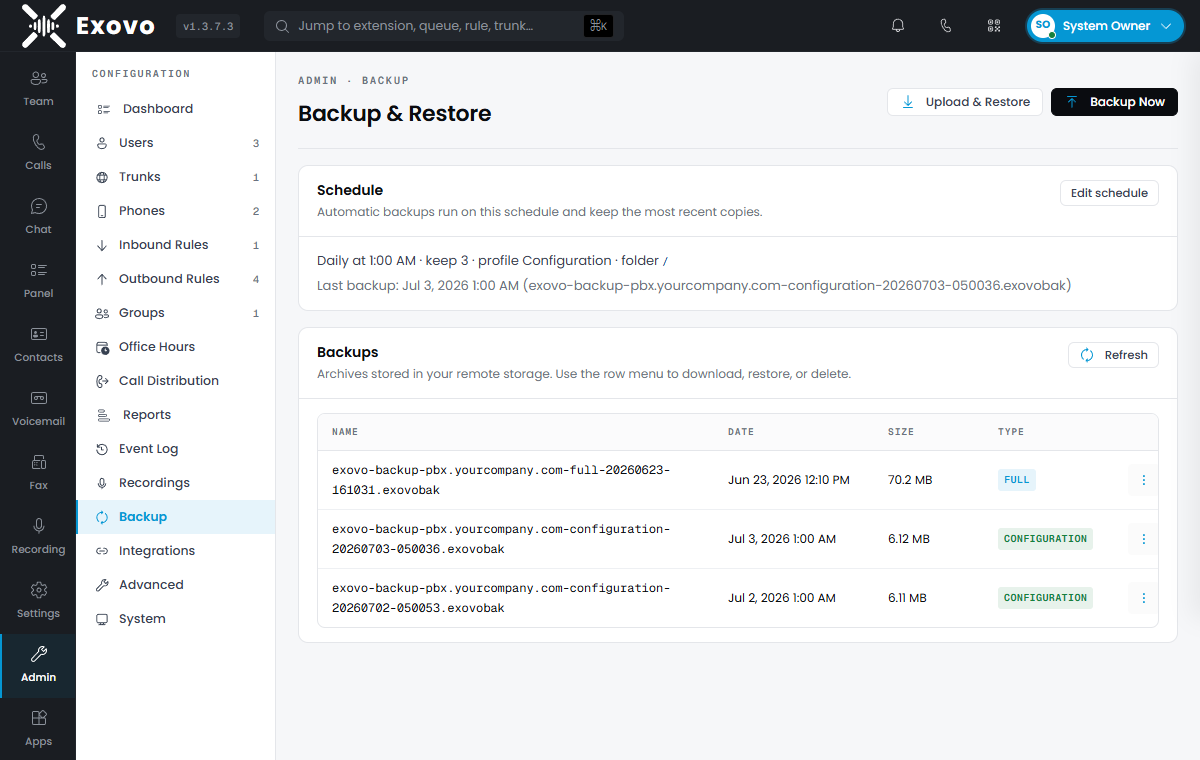
Backups ship to remote storage, so connect that first. Then the backup archive settings define the schedule (daily/weekly/monthly at a set time), the retention rotation (keep the last N), the destination folder, the profile, and the passphrase. Admin → Backup & Restore shows the schedule summary and every backup taken, with download, restore and delete per row. Backup Now takes an on-demand one.
A schedule with no passphrase set is skipped, not run unencrypted — the dashboard shows a banner until one is set, so check for it after setting the schedule up.
Restoring
Two paths, same result:
- Onto the running system — pick a backup on Admin → Backup & Restore (or upload a
.exovobakfile), enter its passphrase, and confirm. The restore is staged and applied by the host watcher with a brief restart — expect a minute or two of downtime, and know that it replaces the entire current configuration. - Onto a new machine — run the installer and choose Restore from backup in the onboarding wizard, feeding it the backup file and passphrase. The new box comes up as the old system: same users, rules and settings. This is the migration path between hosts.
On a multi-tenant machine the wizard offers more: restore the whole box, restore a single tenant live while the others keep running, or migrate a standalone system's backup in as a tenant — see tenant backup, restore and migration.
Migrating from 3CX or Yeastar
The restore wizard doubles as a migration importer. Upload a backup taken on the old system and Exovo detects what it is — no format picker:
- 3CX — a 3CX backup
.zip. If the backup was made with a password, the wizard asks for it. - Yeastar P-Series — a Yeastar backup
.bak. No password needed; Yeastar encrypts every backup with the same fixed key, which Exovo knows. Reading one takes up to a minute — the configuration database inside is unpacked and loaded before the preview appears.
Unlike a native restore, an import merges into the running system instead of replacing it. The wizard shows exactly what it found — extensions, trunks, inbound/outbound rules, ring groups, queues, IVRs, and (3CX) IP phones — with a checkbox per section and a list of notes for anything that needs attention afterwards. Existing items with the same number are overwritten. 3CX imports can also optionally bring the history: call log (CDR), chat, recordings and voicemail, audio included; Yeastar imports are configuration-only.
For 3CX, the preview checks new extension numbers against license capacity and tenant quota before importing. Repeat imports skip existing CDRs and delivered voicemail; voicemail audio must be included in the backup, because external archives are not retrieved. See the 3CX guide for the full repeat-import behavior and the completion counts.
Each source has a dedicated guide covering what comes across and the post-import punch list: migrating from 3CX and migrating from Yeastar P-Series.
What to expect after any import:
- New users get new SIP passwords. Source extension credentials are not carried over — send new users the welcome / set-password email. Existing extensions retain their Exovo SIP credentials when importing 3CX again.
- 3CX trunk credentials carry over; Yeastar's don't. Yeastar stores trunk passwords encrypted, so those trunks are imported disabled — a trunk registering with a missing password would spam your provider. Re-enter the SIP password on each flagged trunk, then enable it.
- Check the clock and calendar. A 3CX import brings the weekly office-hours schedule across (holidays need manual setup); a Yeastar import brings neither — configure your Exovo office hours, then review any time-conditioned routing the notes call out.
Practice the restore
A backup you've never restored is a hope, not a plan. Once a quarter, restore the latest backup into a throwaway VM with the wizard — it proves the passphrase, the file, and your muscle memory in about fifteen minutes.